Free plugins on WordPress.org Pro plugins checked out securely on Freemius Documentation for every plugin Support from the plugin developers Free plugins on WordPress.org Pro plugins checked out securely on Freemius Documentation for every plugin Support from the plugin developers
  • Free editionOn WordPress.org
  • 7-day money-backBuy with confidence
  • Regular updates& compatibility
  • Docs & supportGuides and help

Why Smart Flat Rate Shipping

Why use this plugin?

Simple flat rate shipping that just works.

Charge one clear rate for shipping. The free edition works inside your WooCommerce shipping zones and gives you flat rates with conditions on subtotal, quantity, products, categories and location; Pro adds weight, shipping class, coupon, role and schedule conditions, per-weight and percentage fees, tiered rates, minimum and maximum cost, and import / export of methods.

  • Flat rate shipping methodFree
  • Free shipping thresholdFree
  • Works with WooCommerce shipping zonesFree
  • Weight, shipping class, coupon, role and schedule conditionsPro
  • Per-weight, percentage and tiered pricingPro
  • Import / export of methodsPro

Choose your edition

Free

Get started at no cost
$0Forever · WordPress.org
  • Flat rate shipping method
  • Free shipping threshold
  • Works with WooCommerce shipping zones
Download free
Most popular

Pro

Unlock everything
$49per year · 7-day money-back
  • Everything in Free, plus
  • Weight, shipping class, coupon, role and schedule conditions
  • Per-weight, percentage and tiered pricing
  • Import / export of methods
Buy Pro

Feature tour

Every screen, explained

Shipping Methods & Pricing

How it works

One Smart Flat Rate method in a zone can offer as many flat-rate options as you create. Each option (called a method here) has a fee, optional conditions and a priority.

  • Every enabled method whose conditions match is offered to the customer as its own shipping option.
  • Methods are independent. None hides another, and their prices are never added together (except with the Pro combine group…
  • The cart is checked package by package, using each package's own items and destination.
  • Subtotals always exclude tax.

Shipping Methods & Pricing

Create a shipping method

If something is wrong, the page says "The method was not saved. Please fix the following:" and lists the problems.

  • Go to WooCommerce > Smart Flat Rate and click Add method (or Add your first method if the list is empty).
  • Fill in the General section.
  • Fill in the Pricing section.
  • Optionally add Conditions .

Shipping Methods & Pricing

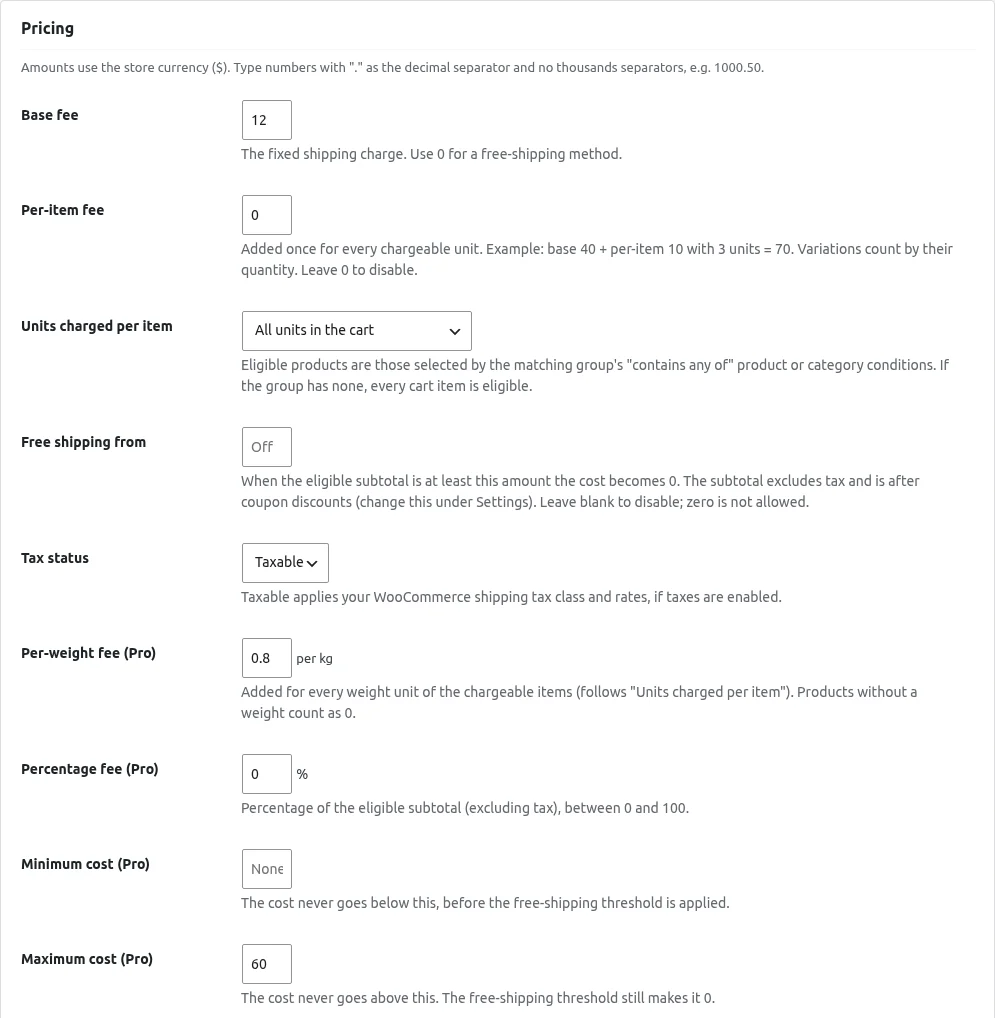
Pricing fields

Amounts use your store currency. Type numbers with . as the decimal separator and no thousands separators, for example 1000.50 .

  • Standard shipping, free over 1000: Base fee 80, Free shipping from 1000.
  • Per-item shipping: Base fee 40, Per-item fee 10. Three items cost 70.

Shipping Methods & Pricing

Priority and the methods list

The Shipping methods tab lists your methods with these columns: Method , Customer label , Amount , Status , Priority and Conditions (a readable summary).

  • Duplicate creates a copy that stays disabled until you enable it.
  • Delete asks for confirmation and cannot be undone.

Shipping Methods & Pricing

Settings

Open the Settings tab and click Save settings after changes.

Conditions

Condition groups (AND / OR)

A method can have at most 10 condition groups, and a group at most 10 conditions. The method list shows a readable summary of the conditions.

  • The method is offered when at least one group matches.
  • Inside a group, every condition must match (AND).
  • Several groups work as OR . Click Add condition group (OR) to add one.
  • With no groups , the method is always offered in the zones it is added to.

Testing & Diagnostics

Test shipping (simulator)

The Test shipping (simulator) tab runs your methods on a sample cart and address. It uses the same rule engine as checkout, but nothing is added to a cart, no order is created, no stock changes and nothing is charged.

  • Under Sample cart , click Add product and search for a product or variation. Set the Quantity . Leave Unit price (excl.
  • Under Destination , choose a Country and optionally enter a State / region code (for example GJ ) and a Postcode .
  • Click Simulate shipping .

Testing & Diagnostics

Diagnostics & help

The Diagnostics & help tab has three parts.

  • Environment checks: each line shows OK or Needs attention .
  • Recent live evaluations: why each method matched or not for real carts.
  • How it works: a short summary of the steps and the rule model.

Pro FeaturesPro

Pro overview tab

Pro feature. With Pro active, a Pro overview tab appears in WooCommerce > Smart Flat Rate . A Pro overview link also appears on the Plugins screen.

  • Get started checklist with live status: add Smart Flat Rate to a zone, create and enable a method, use a Pro condition or fee,…
  • Quick links to add a method, the methods list, the simulator and Import / export.
  • Status : Pro and free plugin versions, how many methods use Pro conditions and Pro pricing, your store weight unit and store time…
  • A Free vs Pro table.

Pro FeaturesPro

Tiered and bulk rates

Pro feature. Charge by ranges of quantity, weight or subtotal using Tiered rate (Pro) .

  • Choose the basis in the first drop-down: Off (no tiered rate) , Quantity (chargeable units) , Weight (in your weight unit) or…
  • Choose the charge type: Flat amount for the range or Rate per unit (quantity or weight x rate) .
  • Type one range per line in the Tiers box as from-to: cost or from+: cost .

Pro FeaturesPro

Import and export methods

Pro feature. Open the Import / export tab.

  • On the other site, open Import / export .
  • Choose the Export file (JSON, up to 1 MB, up to 100 methods).
  • Click Import methods .

How it works

Get started in just 3 simple steps.

  1. 1. Install & activate

    Install the free plugin from WordPress.org, or upload the ZIP you receive after buying Pro.

  2. 2. Configure

    Open the plugin settings and choose the options that fit your store.

  3. 3. You're done!

    Simple flat rate shipping that just works.
Frequently asked questions

Does it replace WooCommerce flat rate?

It adds a smarter flat rate method alongside the built-in shipping methods. You can use either.

How do I get my plugin?

Free editions install from WordPress.org. Pro editions are bought on Freemius, and you receive the ZIP and licence key right after checkout.

Get Smart Flat Rate Shipping today!

Simple flat rate shipping that just works.