FreePro
Shipping · Free plugin
Multiple Shipping Addresses
Let customers save up to 3 shipping addresses and pick one at checkout.
- WordPress plugin
- WooCommerce compatible
- 6Features
- FreeEdition
- 4Screenshots

- Free editionOn WordPress.org
- Secure checkoutSafe & simple
- Regular updates& compatibility
- Docs & supportGuides and help
Why Multiple Shipping Addresses
Why use this plugin?
Let customers save up to 3 shipping addresses and pick one at checkout.
Give repeat customers a faster checkout. Multiple Shipping Addresses lets logged-in customers save up to 3 shipping addresses in My Account and pick one at checkout, on both the classic and the block checkout. It is an address book: one order still goes to one address.
- Save up to 3 shipping addresses per customer
- Pick a saved address at checkout, with shipping and tax recalculated
- Works with the classic and the block checkout
- Address labels: Home, Office, Gift or Other
- Set a default address
- Manage addresses in My Account > Shipping Addresses
Get this plugin
Free
Get started at no cost$0Forever · WordPress.org
- Save up to 3 shipping addresses per customer
- Pick a saved address at checkout, with shipping and tax recalculated
- Works with the classic and the block checkout
- Address labels: Home, Office, Gift or Other
- Set a default address
- Manage addresses in My Account > Shipping Addresses
Feature tour
Every screen, explained
Installation & Setup
Settings page
Open Multiple Shipping Addresses in the left admin menu (the location pin icon). Only administrators (users who can manage options) can change these settings.
For Customers
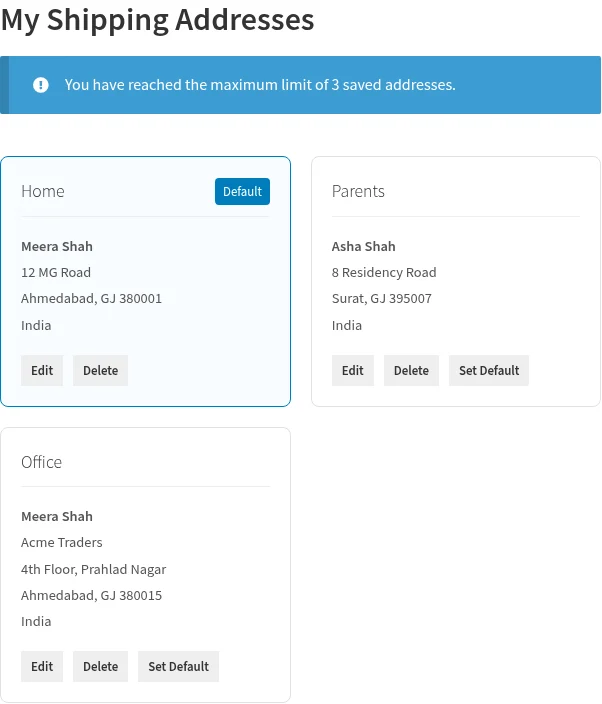
Manage addresses in My Account
Customers must be logged in. Go to My Account > Shipping Addresses.
- Add an address
- Edit, delete or set a default
- Address fields
For Customers
Use a saved address at checkout
On the block-based Checkout the picker appears at the top of the Shipping address step.
- Log in, add products to the cart and go to checkout.
- In the Shipping section, a list of saved addresses appears as radio options, even before the customer ticks Ship to a different…
- Select an address. All shipping fields, including country and state, are filled in at once and shipping and tax are recalculated…
- To type a different address, choose New / Different Address.
How it works
Get started in just 3 simple steps.
- 1. Install & activate
Install the plugin from WordPress.org and activate it.
- 2. Configure
Open the plugin settings and choose the options that fit your store.
- 3. You're done!
Let customers save up to 3 shipping addresses and pick one at checkout.
Frequently asked questions
Can one order ship to several addresses?
No. It is an address book: one order still goes to one address.
Does it work for guests?
No. Saving addresses needs a customer account, so guests see the normal checkout form.
Can a customer save more than 3 addresses?
No. The free version saves up to 3 addresses per customer. You can lower the limit in the settings.
Does it work with the block checkout?
Yes, since version 1.1.0.
How do I get my plugin?
Search for the plugin in Plugins → Add New in your WordPress dashboard, or download it from WordPress.org.
Get Multiple Shipping Addresses today!
Let customers save up to 3 shipping addresses and pick one at checkout.