Pro
Forms · Digital
Paddle Gateway
Accept Paddle Billing payments for one-time and recurring memberships.
View product→Forms · Pro plugin
Secure Mollie payments with multiple methods and member support.

Why Mollie Gateway
Secure Mollie payments with multiple methods and member support.
Accept payments through Mollie with a clean checkout card, multiple payment methods and a secure pay flow, including support for member checkouts.
Get this plugin
Feature tour
Payments tab
Go to Memberships > Settings > Payments and set Payment Gateway to Mollie under Global Settings.
Connection tab
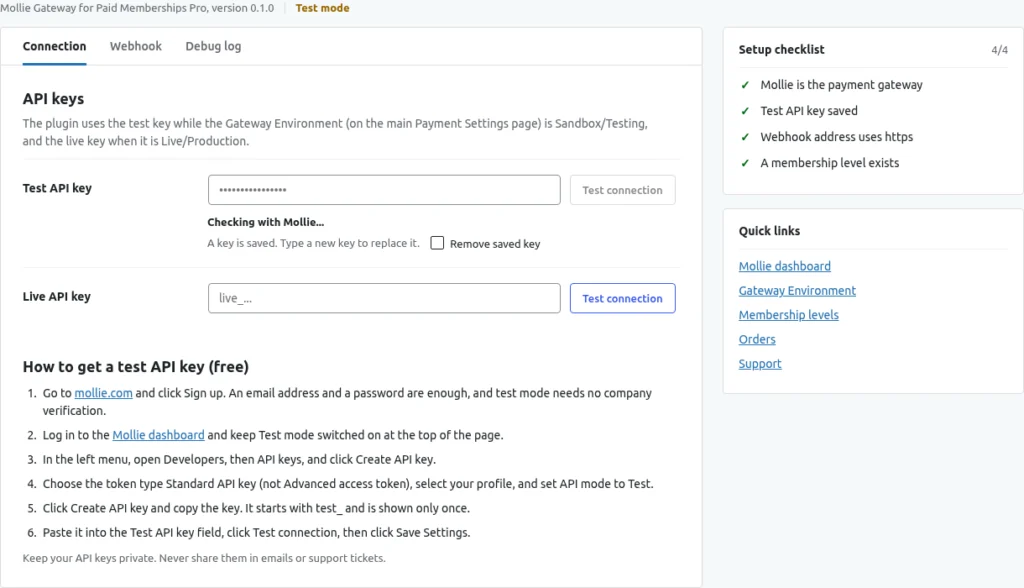
The Mollie settings have three tabs: Connection, Webhook and Debug log, with a Setup checklist on the right.
Levels tab
Create your levels in PMPro as usual. The plugin reads the level at checkout.
Checkout tab
There is no card form on your site. The member pays on Mollie's own payment page, so card details never reach your website.
Members & orders tab
After a purchase the member is listed under Memberships > Members with the level and the status Active.
Debug log tab
Open the Debug log tab, tick Log Mollie requests and webhooks for 30 days, and click Save Settings.
Get started in just 3 simple steps.
Install the free plugin from WordPress.org, or upload the ZIP you receive after buying Pro.
Open the plugin settings and choose the options that fit your store.
Secure Mollie payments with multiple methods and member support.
Yes. You connect your own Mollie account with an API key.
Free editions install from WordPress.org. Pro editions are bought on Freemius, and you receive the ZIP and licence key right after checkout.
Secure Mollie payments with multiple methods and member support.