FreePro
Orders · Digital
Autocomplete WooCommerce Orders
Automatically complete paid orders so you never do it by hand.
View product→Orders · Free plugin
Email customers when a sold-out product is available again.

Why Back In Stock Notifier Lite
Email customers when a sold-out product is available again.
Turn sold-out pages into sales. Visitors leave their email on a sold-out product and get a message as soon as it is back in stock.
Get this plugin
Feature tour
Installation & Setup
Go to WooCommerce > Back In Stock and open the Settings tab. Anyone with the manage_woocommerce capability (shop managers and administrators) can open this screen and change settings. Click Save Changes when done.
For Customers
On classic themes the form is placed after the product summary content, using the woocommerce_single_product_summary hook. On block themes it is appended after the WooCommerce Add to Cart Form block on single product pages.
For Customers
The form contains a hidden honeypot field; if a bot fills it in, the request is answered with a success message but nothing is saved. Each IP address is limited to 10 signups per hour. There is no other CAPTCHA.
For Customers
Every customer email carries a one-click unsubscribe link built from a private token that is unique to that subscription. The email also includes a List-Unsubscribe header with the same link.
Sending Emails
Turn on Email me on new signups in Settings, and set Admin email . Each time a new signup is saved, a plain email is sent to that address with the subject New back-in-stock signup: [product name] and a line saying which email address subscribed to which…
Managing Subscribers
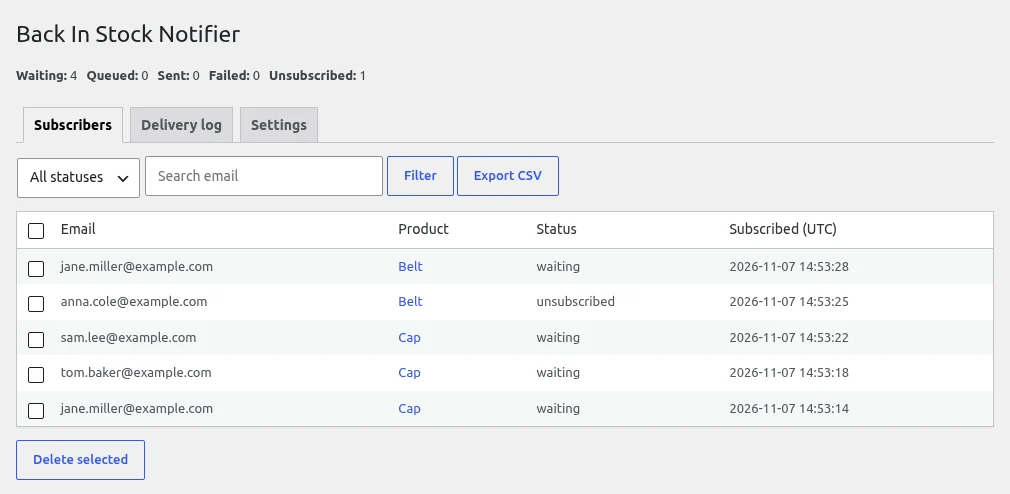
Go to WooCommerce > Back In Stock . The plugin screen has three tabs: Subscribers , Delivery log and Settings .
Managing Subscribers
The Delivery log tab lists subscribers whose status is sent or failed , most recently notified first. Columns: Email , Product , Status , Sent at (UTC) , Attempts and Error .
Managing Subscribers
The download is named back-in-stock-subscribers-YYYY-MM-DD.csv and contains the columns email , product_id , variation_id , product , status , subscribed_utc and notified_utc .
Get started in just 3 simple steps.
Install the plugin from WordPress.org and activate it.
Open the plugin settings and choose the options that fit your store.
Email customers when a sold-out product is available again.
Not yet. This Lite edition is free.
Search for the plugin in Plugins → Add New in your WordPress dashboard, or download it from WordPress.org.
Email customers when a sold-out product is available again.
Enter your email and phone number. We will email you the plugin ZIP right away.