Free plugins on WordPress.org Pro plugins checked out securely on Freemius Documentation for every plugin Support from the plugin developers Free plugins on WordPress.org Pro plugins checked out securely on Freemius Documentation for every plugin Support from the plugin developers
  • Pro pluginPremium features
  • 7-day money-backBuy with confidence
  • Regular updates& compatibility
  • Docs & supportGuides and help

Why Mollie Gateway

Why use this plugin?

Secure Mollie payments with multiple methods and member support.
Accept payments through Mollie with a clean checkout card, multiple payment methods and a secure pay flow, including support for member checkouts.

  • Mollie checkout integration
  • Multiple payment methods
  • Secure pay flow
  • Member checkout support

Get this plugin

Pro

Premium plugin
$49per year · 3-day free trial · 7-day money-back
  • Mollie checkout integration
  • Multiple payment methods
  • Secure pay flow
  • Member checkout support
Buy Pro

Feature tour

Every tab, explained

Payments tab

Choose Mollie in PMPro

Go to Memberships > Settings > Payments and set Payment Gateway to Mollie under Global Settings.

  • Set Gateway Environment to Sandbox/Testing while you test
  • Sandbox uses your test_ key, Live uses your live_ key
  • Mollie is then listed under Payment Gateway Settings as Enabled

Connection tab

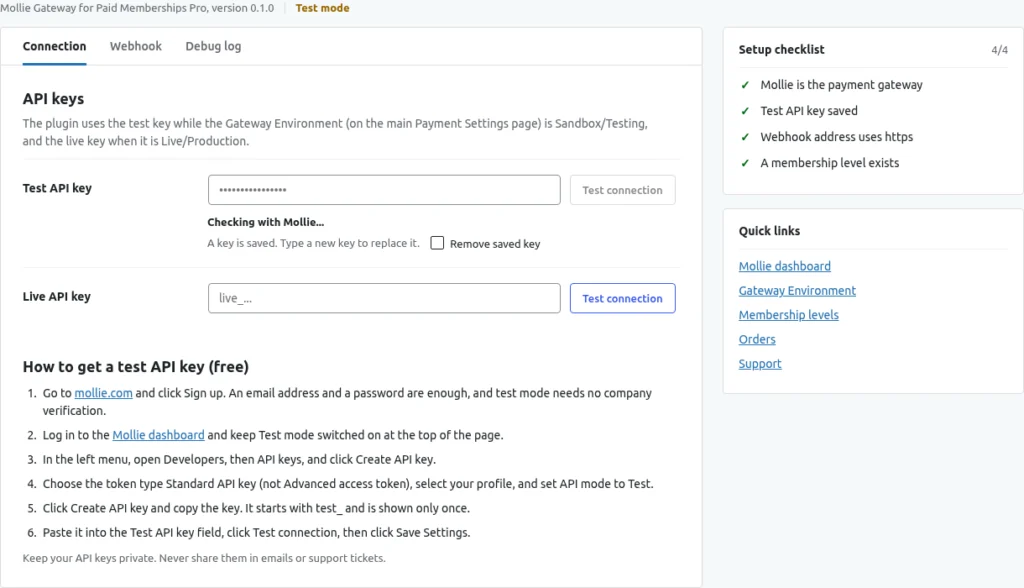
Connection: enter your API key and test it

The Mollie settings have three tabs: Connection, Webhook and Debug log, with a Setup checklist on the right.

  • Paste your test_ key into Test API key
  • Test connection asks Mollie if the key works before you save anything
  • A green message means it is connected; then click Save Settings

Levels tab

Membership levels: one-time and recurring

Create your levels in PMPro as usual. The plugin reads the level at checkout.

  • One-time levels: the member makes one Mollie payment
  • Recurring levels: the first payment saves permission to be charged again, then a Mollie subscription is created
  • A billing limit stops the Mollie subscription after that many charges
  • Tax is calculated by PMPro and included in the amount sent to Mollie

Checkout tab

Checkout: members pay on Mollie's page

There is no card form on your site. The member pays on Mollie's own payment page, so card details never reach your website.

  • The membership starts as soon as Mollie confirms the payment
  • Mollie sends the member back to PMPro's confirmation page

Members & orders tab

Members and orders: see that it worked

After a purchase the member is listed under Memberships > Members with the level and the status Active.

  • Orders show the status Paid, the gateway Mollie and a transaction ID starting with tr_
  • Refund Order in Order Actions asks Mollie to refund the full order total
  • Cancelling a membership stops the Mollie subscription

Debug log tab

Debug log: see what happened

Open the Debug log tab, tick Log Mollie requests and webhooks for 30 days, and click Save Settings.

  • The ten latest entries show their time (UTC), the event and a message
  • Errors are always logged, even with the log off
  • API keys and tokens are replaced with [removed] before anything is stored

How it works

Get started in just 3 simple steps.

  1. 1. Install & activate

    Install the free plugin from WordPress.org, or upload the ZIP you receive after buying Pro.

  2. 2. Configure

    Open the plugin settings and choose the options that fit your store.

  3. 3. You're done!

    Secure Mollie payments with multiple methods and member support.

Frequently asked questions

Do I need a Mollie account?

Yes. You connect your own Mollie account with an API key.

How do I get my plugin?

Free editions install from WordPress.org. Pro editions are bought on Freemius, and you receive the ZIP and licence key right after checkout.

Get Mollie Gateway today!

Secure Mollie payments with multiple methods and member support.