Free plugins on WordPress.org Pro plugins checked out securely on Freemius Documentation for every plugin Support from the plugin developers Free plugins on WordPress.org Pro plugins checked out securely on Freemius Documentation for every plugin Support from the plugin developers
  • Pro pluginPremium features
  • Secure checkoutSafe & simple
  • Regular updates& compatibility
  • Docs & supportGuides and help

Why Database for Contact Form 7

Why use this plugin?

Store every CF7 entry in your database with tables and charts.
Contact Form 7 sends emails but does not keep entries. This plugin saves every submission to your WordPress database, so you can search, filter, export and chart them from the admin.

  • Save all CF7 submissions
  • Searchable entries table
  • CSV export
  • Entries chart by day

Get this plugin

Pro

Premium plugin
Pricing soonPro edition
  • Save all CF7 submissions
  • Searchable entries table
  • CSV export
  • Entries chart by day

Feature tour

Every tab, explained

Entries tab

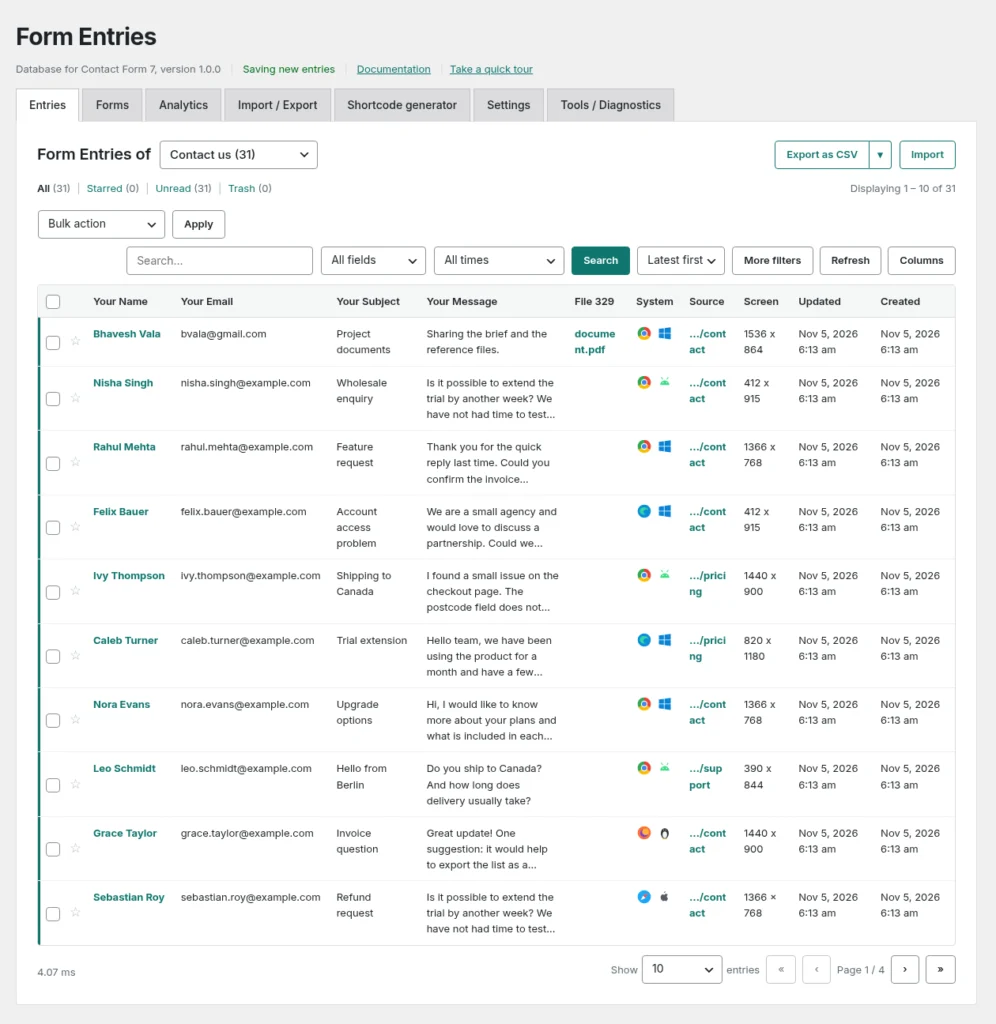
Entries: every submission in one list

Pick a form to see its entries, or All forms for one combined list. The table shows every field of the form as its own column.

  • Views: All, Starred, Unread and Trash
  • Search all fields or one field, with date ranges and more filters
  • Open, edit and delete an entry, add private notes, and use bulk actions
  • Files uploaded with a form are kept in a private folder

Forms tab

Forms: choose what gets saved

Lists every Contact Form 7 form, including the ones with no submissions yet, with a switch to start or stop saving its entries.

  • By default every form is saved, including forms you create later
  • The change is saved the moment you flip the switch
  • Entries that were already saved are never deleted when you switch a form off

Analytics tab

Analytics: your entries at a glance

Everything on this screen is counted from your saved entries. Nothing is estimated and no outside service is used.

  • Totals for Today, Yesterday, Last 7 days and Last 30 days, plus Unread, Read and Starred
  • Entries over time, grouped daily, weekly or monthly
  • Entries by form and top source pages
  • Devices, browsers, operating systems and screen sizes

Import / Export tab

Import / Export: move entries in and out

Choose a form (or all forms), a format, a delimiter, a date range and the columns, then download your export.

  • Formats: CSV, Excel (XLSX) or JSON
  • Import from CSV or JSON; JSON is the best way to copy entries to another site
  • Import files up to 25 MB and 200,000 rows

Shortcode generator tab

Shortcode generator: show entries on your site

Choose the form and columns, tick the options and copy the shortcode into a page. The preview is the real table.

  • Options: sortable, pagination, search box, export button and date filters
  • Private by default: visitors who are not logged in see nothing

Settings tab

Settings: control capture and privacy

Settings is split into sections: Capture, Entries screen, Import & export, Files, Privacy & retention, Shortcode and Maintenance.

  • Save new entries, and choose which forms to save
  • Every extra detail about the visitor has its own switch
  • Reset Section or Reset All; your entries are never touched

Tools / Diagnostics tab

Tools / Diagnostics: find problems fast

Shows your versions, whether the private files folder is writable, whether XLSX export is available, and the last 50 capture problems.

How it works

Get started in just 3 simple steps.

  1. 1. Install & activate

    Install the free plugin from WordPress.org, or upload the ZIP you receive after buying Pro.

  2. 2. Configure

    Open the plugin settings and choose the options that fit your store.

  3. 3. You're done!

    Store every CF7 entry in your database with tables and charts.

Frequently asked questions

Does it slow down my forms?

No. Entries are written to the database after the form is sent, so visitors see no delay.

How do I get my plugin?

Free editions install from WordPress.org. Pro editions are bought on Freemius, and you receive the ZIP and licence key right after checkout.

Get Database for Contact Form 7 today!

Store every CF7 entry in your database with tables and charts.